
ERP for the Construction Industry and Infrastructure: A 2026 Guide
What's new: Support timelines for Dynamics SL and SAP ECC, construction-specific ERPs, costs, German and EU e-invoicing rules, a build vs buy table, implementation steps, mistakes and an FAQ.
Summarize with AI
Read summarized version with AI
- A construction ERP tracks everything against projects: job costs, change orders, progress billing, retentions, subcontractors, equipment and labor.
- Microsoft Dynamics SL 2018 extended support ends in July 2028 and SAP ERP 6.0 mainstream maintenance ends at the end of 2027, so many companies face a migration decision.
- Germany requires businesses to receive structured e-invoices since 2025 and to issue them from 2028; the EU ViDA package adds digital reporting from July 2030.
- For most firms the best setup is a standard ERP core connected to specialist tools, with custom modules only where the business is different.
- Licences are often the smallest cost; budget for implementation, data migration, integrations, training and support.
The pandemic accelerated the adoption of digital tools across the construction industry. Construction companies adopted collaboration software, data analytics, BIM and ERP systems, and each of them produces data that business leaders want to analyze. The problem is that the data rarely connects. Research by Autodesk and FMI estimated that bad data may have cost the global construction industry $1.848 trillion in 2020, Re-typing the same information between systems that do not talk to each other is one of the most common ways bad data gets in.
An ERP system is meant to fix that by bringing finance, projects, procurement, people and equipment into one system. In this guide we explain what business owners and construction managers need to know about ERP in 2026: what a construction ERP does, when a company needs one, which systems are on the market, what has changed in the last few years, what an ERP costs, and when a custom or hybrid solution makes more sense than a standard product.
What is ERP (Enterprise Resource Planning)
ERP is software that manages and automates a company’s core business processes in one system with one database: finance and accounting, procurement and inventory, human resources and payroll, sales and customer relationships, and reporting. Instead of each department keeping its own spreadsheets and tools, everyone works on the same data.
A typical ERP consists of a core platform with a shared database and modules that a company switches on as needed. ERP systems are used in almost every sector, including construction, where planning and resource management decide whether a project makes money.
What is ERP for a construction company
ERP for construction is a system for planning and managing the business processes of a construction organization. It combines disparate software into one integrated environment. The main difference from a general ERP is that construction companies make money project by project, so everything, from costs and invoices to people and equipment, has to be tracked against a specific project and its budget.
Key features of a construction ERP include:
- distribution of work between employees and subcontractors;
- operational planning and detailed analysis of work, daily, weekly and monthly;
- resource planning down to a specific vehicle, machine or trade;
- job costing: planned versus actual costs per project, cost code and work package;
- change order management, so approved changes update budgets and contract values;
- progress (interim) billing and tracking of retentions held by clients or withheld from subcontractors;
- subcontractor management, including contracts, compliance documents and settlements;
- equipment management, from location and utilization to maintenance and depreciation;
- payroll and time tracking that allocate labor costs to projects;
- data visualization and dashboards for project and company performance.
A construction ERP gives control over how resources are allocated across the whole company. It also serves as a platform for integrating analytics, CRM, estimating and project management tools, and it provides current operational and financial data that helps management coordinate goals for the company as a whole and for each department.
Construction ERP vs project management and accounting software
Many construction companies already use several tools and wonder which one should be the system of record. The roles differ:
| Tool | Main job | Typical users | What it usually lacks |
|---|---|---|---|
| Accounting software | Bookkeeping, invoices, tax, statutory reporting | Finance team | Project costs, budgets, progress and resources |
| Construction project management software | Documents, RFIs, schedules, defects, site diaries | Project and site teams | Company-wide finance, payroll and procurement |
| Estimating software | Quantities, prices, bids | Estimators | Cost control after the contract is signed |
| Construction ERP | Financial and operational backbone across all projects | Finance, operations, management | Often weaker on field tools and documents, so it is integrated with them |
In practice most mid-sized and larger contractors run an ERP as the financial backbone and connect it to specialist field, document and estimating tools. The quality of those connections decides whether the ERP actually shows the truth.
When do you need to implement an ERP system
If you have a small business and can keep all the information about the company’s work in your head, or manage with accounting software and a CRM, an ERP is unlikely to be worth it yet. It is worth considering if you face several of these situations:
- Handing a task over between departments takes a long time.
- Employees spend a lot of time on routine tasks and re-typing data.
- The accounting department is slow to complete paperwork and month-end closing.
- You cannot quickly get information about the work of a department or a project.
- It is difficult to see which projects are profitable until they are finished.
- Interaction with customers and subcontractors is complicated and paper-based.
- The working environment is fragmented, and files cannot be transferred from one program to another.
Construction companies have a few additional warning signs: job costs that are only known after the final account, change orders that never reach the budget, equipment that nobody can locate, and progress invoices that take weeks to prepare. If two or three of these problems are familiar, it makes sense to look seriously at an ERP, standard or custom, that fits your business.
How ERP solves problems in the construction industry
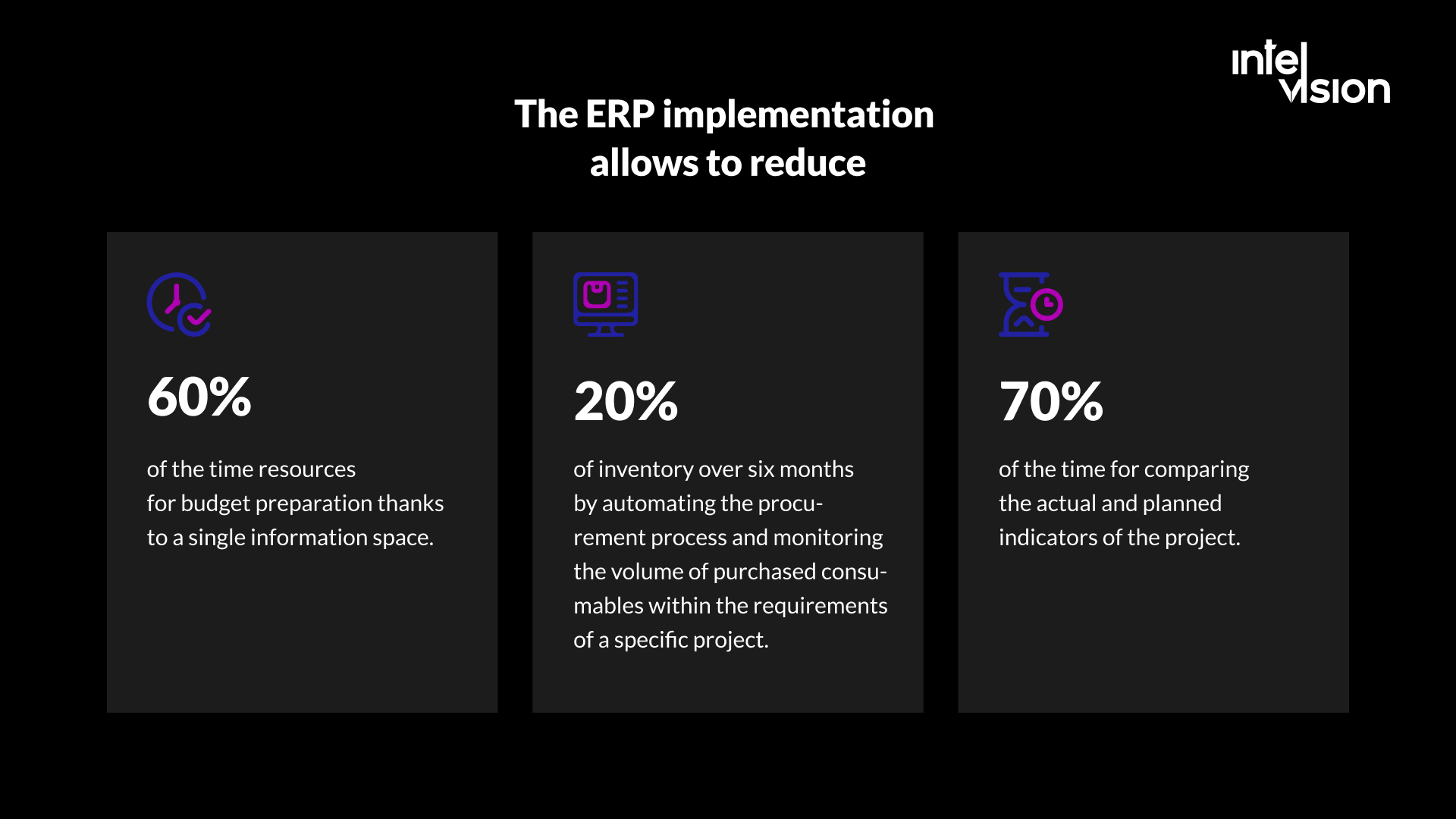
A well-implemented construction ERP reduces overhead by cutting manual work and paperwork, gives control over the whole chain of business processes, and shortens the time from a problem on site to a decision in the office. These are the main mechanisms.
1. Workflow automation
Construction ERP systems automate repetitive processes: purchase approvals, invoice matching against orders and delivery notes, timesheet allocation, and recurring reports. Teams spend less time on routine work and more on tasks that affect revenue and margin.
2. Transparent processes and easy collaboration
The ERP centralizes data and makes it available to everyone who needs it. An engineer can see stock levels of materials and planned deliveries; a project manager can see committed costs before the invoices arrive; management can see the margin of every project at the same moment.
3. Risk management and data security
Centralized data is easier to protect, back up and audit than files spread across laptops and email. Role-based access controls who sees contract values, salaries and bank details, and audit logs show who changed what.
4. Configurable solutions
Construction ERP software can be configured for different parts of the industry, from general contractors and subcontractors to housebuilders, maintenance and service organizations, and civil engineering firms. Dashboards can reflect each manager’s role and prompt them with scheduled tasks and project information.
5. Reporting and planning
With an ERP you can build reports and analytics across departments and projects without merging dozens of spreadsheets. You can track cash flow and compare planned and actual receipts, and you can enforce documentation requirements by making employees fill in documents from templates the system checks.
The gains come from connecting data, not from replacing every system. For a German construction project management consultancy, we found that project steering engineers spent 30-40% of their billable capacity on administration, including manual data extraction across three disconnected systems. The roadmap we built did not replace those systems: it proposed read-only API connections that compile compliance and phase-gate documentation automatically, plus rule-based invoice auditing, for a modelled value of €4.19M.
Construction ERP options in 2026: what changed
If you chose an ERP a few years ago, check where your system is in its life cycle. Two of the three big names in our 2022 version of this article are nearing the end of support:
- Microsoft Dynamics SL was a popular project-focused ERP for construction and professional services. According to Microsoft’s lifecycle page, mainstream support for Dynamics SL 2018 ended in January 2024 and extended support ends on July 12, 2028. It is not a choice for a new implementation, and current users should plan their migration now. Microsoft’s cloud ERP for small and mid-sized companies, Business Central, is listed at $80 per user per month for Essentials and $110 for Premium, paid yearly.
- SAP ERP 6.0 (often called ECC) reaches the end of mainstream maintenance at the end of 2027, with optional extended maintenance until the end of 2030, while SAP has committed to maintaining S/4HANA until the end of 2040, according to SAP. Construction companies still on ECC are in the middle of a migration decision.
Alongside general ERPs from SAP, Oracle and Microsoft, several construction-specific systems are worth a look:
| System | Focus | Notes from the vendor |
|---|---|---|
| Trimble Viewpoint Vista | Contractors, including service contractors | Job-cost accounting with change orders and work in progress, payroll including union payroll, equipment and service management |
| CMiC | General contractors, subcontractors, civil and highway firms | Financials, payroll, equipment and project management on a single database |
| RIB 4.0 | Construction companies, developers, infrastructure operators | Estimating, procurement, project control and optional BIM 5D; on-premises or Azure cloud; connects to other ERPs |
| NEVARIS Finance | German construction companies | Cloud-based ERP for the commercial processes of construction, alongside NEVARIS Build for tendering, estimating and billing |
When you compare systems, prioritize the ability to evaluate financial performance per project, so you see the real profit of each job. The ERP should cover scheduling and planning, cash accounting, income and expenses, and the documents that developers, general contractors and subcontractors exchange. It must support the full structure of construction projects, with all their cost and income items.
Off-the-shelf, custom or hybrid: how to choose
In 2022 we wrote that the best construction ERP is a custom one. Our view today is more precise: the best ERP is usually a standard core with custom parts where your business is different.
| Approach | When it fits | Main risk |
|---|---|---|
| Off-the-shelf construction ERP | Your processes match common construction practice and your market’s standards | Bending your processes to the software, or heavy customization that makes upgrades painful |
| General ERP with construction add-ons | You also run non-construction businesses or already use the vendor’s ecosystem | Construction-specific features that feel bolted on |
| Hybrid: standard ERP plus custom modules and integrations | Most of your finance is standard, but field processes, client portals or regulated documentation are specific to you | Integration quality; needs clear ownership of the data model |
| Fully custom ERP | Your operating model is your competitive advantage, or no product fits a niche such as a ConTech platform | Higher initial cost; you own maintenance and long-term development |
Small and mid-sized construction businesses can sometimes cover part of the ERP role with a CRM and accounting software combined. The decision point is usually job costing: once you cannot see project margins in time to act, you need more than that.
What a construction ERP costs
ERP cost has several parts, and licence fees are often the smallest:
- Licences or subscriptions, usually per user per month for cloud systems. Business Central’s list prices above give one reference point.
- Implementation: process analysis, configuration, customization and testing.
- Data migration from old systems, including cleaning project, supplier and cost code data.
- Integrations with estimating, project management, payroll, banking and e-invoicing.
- Training and change management for office and site staff.
- Support and further development after go-live.
For a custom solution, cost depends on the number of modules, the requirements and the integrations. As a published reference from our own work, the Get Worker project, a custom web and mobile system for a construction company’s employee records, vacation requests and work schedules, integrated with its existing database, ran for 3 months with a budget of EUR 30k+ and went from onboarding to release in 2 months. A full ERP covering finance, procurement and payroll is a larger undertaking; a phased plan with a business case for each phase keeps it under control. Our business case development work starts exactly there: what is worth building, what it is worth, and in which order.
Regulatory changes your ERP must handle
Electronic invoicing is the change most European construction companies feel first. In Germany, according to the IHK Köln summary of the rules:
- since January 1, 2025, all domestic businesses must be able to receive structured e-invoices from other businesses, and an emailed PDF no longer counts as an e-invoice;
- in 2027, other invoice formats remain allowed only with the recipient’s consent and only for issuers whose prior-year turnover was up to EUR 800,000;
- from 2028, issuing e-invoices in a structured format that conforms to the European standard is mandatory.
At EU level, the VAT in the Digital Age (ViDA) package entered into force on April 14, 2025. Member states may now introduce mandatory e-invoicing under specific conditions, and digital reporting requirements, mainly for cross-border B2B transactions, take effect on July 1, 2030.
For a construction company this means the ERP must create, send, receive and validate structured invoices, match them against orders, contracts and progress measurements, and archive them correctly. If your current system cannot, that alone can justify an upgrade or an integration project.
Key construction ERP trends
Over the coming years, construction companies will keep adapting their ERP to new technologies. These trends matter most:
Artificial intelligence and machine learning. AI tools naturally intersect with ERP, because the ERP holds the integrated data they need. Practical uses in 2026 are extracting data from supplier invoices and delivery notes, flagging cost lines that deviate from the budget, forecasting cash flow and project margins, and answering questions about contracts and documents. AI is only as good as the data underneath, which is one more reason to clean up master data before adding it.
Cloud ERP. Vendors are moving customers from on-premises systems to cloud subscriptions, as the Dynamics SL and SAP timelines show. Cloud ERPs are easier to reach from the site, but they change how customizations are built: more through APIs and extensions, less through changes to the core.
Integration and open APIs. Construction companies use many specialist tools. An ERP with well-documented APIs lets you connect estimating, BIM, project management and field apps instead of re-typing data.
Augmented reality. AR devices can show the location of pipes and wires behind walls and other information that is hard to access on site. Connected to ERP and BIM data, AR lets workers see the asset, its specification and its maintenance history in one view, and new staff can practice tasks in a realistic environment without risk.
The Internet of Things. Equipment, materials, drones and site sensors can feed data into the ERP: machine hours for equipment costing, material levels for procurement, and conditions on site for scheduling. That data helps companies find productivity gains and new ways of working.
How to implement a construction ERP: step by step
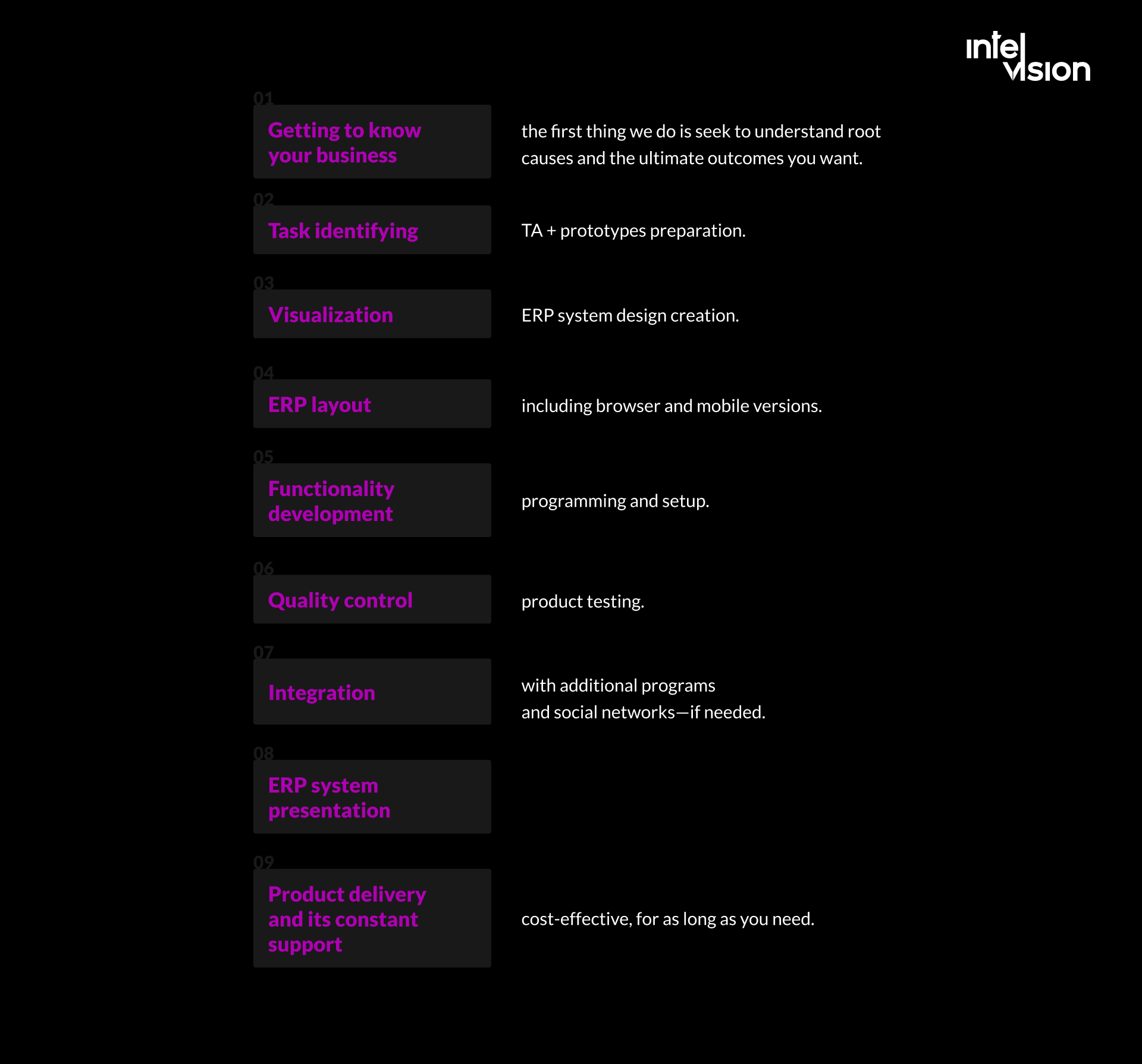
Whether you buy, build or combine, the implementation follows the same path. This is the process we use for custom and hybrid ERP projects:
- Get to know the business. Understand root causes and the outcomes you want, not only the features requested.
- Map the processes and data. Document how estimating, procurement, project control, billing and payroll work today, and where data is entered twice.
- Define the scope and the business case. Write requirements, prototype key screens, and decide what to buy, what to configure and what to build.
- Design the system. Create the ERP design, including browser and mobile versions for site teams.
- Develop and configure. Build in short iterations, with users reviewing each increment.
- Migrate data. Clean and move project, supplier, cost code and open-item data, and reconcile it with the old system.
- Test. Run quality control on functionality, integrations and performance, and run a pilot project end to end.
- Integrate. Connect estimating, project management, banking, payroll and e-invoicing systems.
- Train and go live, project by project or company-wide, with support close at hand in the first weeks.
- Support and improve the system for as long as you need it.
Common ERP implementation mistakes in construction
- Automating today’s mess. If cost codes, approvals and change processes are inconsistent, an ERP makes the inconsistency faster.
- Leaving the site out. If foremen and project managers cannot enter time, deliveries and progress easily, the ERP’s project data will always be late.
- Over-customizing a standard product, which makes every upgrade expensive.
- Underestimating data migration. Old supplier and project data is rarely clean enough to move as it is.
- Big-bang go-live across all projects instead of a pilot followed by a staged rollout.
- No owner after go-live. An ERP needs someone responsible for its data, users and further development.
- Ignoring the support timeline of the product you choose, as Dynamics SL and SAP ECC users are now finding out.
ERP solutions for the construction industry from Intelvision
Intelvision builds and modernizes software for construction and ConTech companies, implements AI in real workflows and adds senior engineers to product teams. We have delivered 100+ software products and hold a 5.0 rating on Clutch.
Our construction work includes the Get Worker system described above, the roadmap for a German project management consultancy that connected three disconnected systems instead of replacing them, and ING+, a German platform for municipalities and infrastructure service providers, where our dedicated team built features including construction site management, a survey builder and a ticket system, and delivered a 40% reduction in development costs. If your existing ERP needs to be replaced or upgraded, our migration and modernization service covers the move; if the problem is disconnected systems, our data and integrations work connects them. For the finance side of ERP, see our guide to ERP for finance.
We calculate the cost of a custom or hybrid ERP individually, based on the number of modules, the requirements and the integrations, and we are happy to give you an estimate for your project.
Bottom line
- An ERP manages a company’s core processes on one database, with a core platform and modules added as needed.
- A construction ERP adds what construction needs: job costing, change orders, progress billing, retentions, subcontractor, equipment and project-based payroll management.
- Check the life cycle of your system: Dynamics SL 2018 extended support ends in July 2028, and SAP ERP 6.0 mainstream maintenance ends at the end of 2027.
- E-invoicing rules in Germany and the EU’s ViDA package make structured invoicing a requirement your ERP must handle.
- For most companies, the best setup is a standard core, connected to specialist tools, with custom modules where the business is genuinely different. Small businesses can often start with accounting software and a CRM.
An ERP brings data into one place and lets you respond to change quickly. Most construction companies already have financial and operational systems, but many are limited to current operations and cannot support growth. As companies expand, their needs change. Let’s talk: you get a direct answer on whether we can help and what should happen first.
Sources
- Autodesk and FMI: Harnessing the Data Advantage in Construction
- Microsoft Lifecycle: Dynamics SL 2018
- Microsoft Dynamics 365 Business Central pricing
- SAP: SAP extends its innovation commitment for SAP S/4HANA and provides clarity on SAP Business Suite 7
- Trimble Viewpoint Vista
- CMiC construction ERP
- RIB Software: RIB 4.0
- NEVARIS
- IHK Köln: E-Rechnungen
- European Commission: VAT in the Digital Age (ViDA)
Read Intelvision often? Add us as a preferred source in Google Search.
Add to preferred sources